GoHighLevel Missed Call Text Back: Setup Guide + Templates
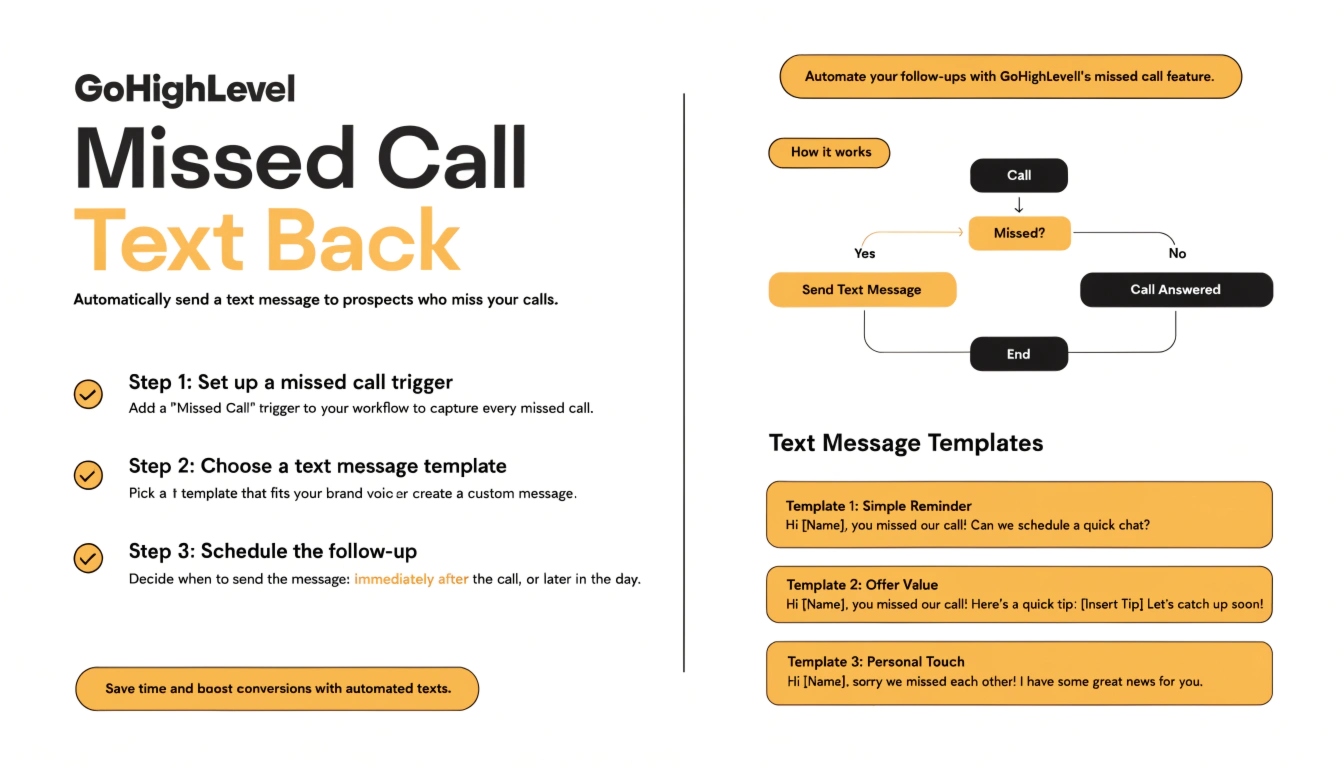
Missed call text back is a GoHighLevel automation that instantly sends an SMS to anyone whose call goes unanswered, so the lead gets a response within seconds instead of hanging up and calling a competitor. It’s built with a single workflow trigger (“Missed Call”) and takes under 15 minutes to configure once your phone number and A2P 10DLC registration are in place.
Every unanswered business call is a lead who’s actively decided to pick up the phone right now — the highest-intent action a prospect can take before booking. If nobody answers, most callers don’t leave a voicemail. They call the next business on the list. Missed call text back closes that gap automatically, and it’s consistently one of the fastest automations to set up and the fastest to show a measurable difference in booked calls.
This guide walks through the exact setup, the prerequisites people skip and regret, and text templates you can copy directly into your workflow.
Why This Automation Matters More Than It Sounds
A few numbers explain why this is usually the first automation any GoHighLevel setup should include:
Compare that to the alternative most businesses run today: a missed call that just sits there until someone happens to notice it in the call log.
Prerequisites Before You Build This Workflow
Skipping these is the most common reason the automation doesn’t fire, or the text never arrives:
If you already have a workflow that isn’t triggering as expected, check our workflow not triggering troubleshooting guide before assuming the setup below is broken — it usually isn’t.
Step-by-Step Setup
Text Message Templates
Keep these short, conversational, and specific — a text that reads like a form letter gets ignored.
General service business:
“Hey! Sorry we missed your call. What can we help with? Reply here or grab a time that works for you: [booking link]”
Accounting/tax practice (tax season):
“Hi, this is [Firm Name] — sorry we missed you! Tax season has us slammed on calls. Text back what you need or book a quick consult here: [booking link]”
Home services / contractor:
“Thanks for calling [Company]! We’re on a job right now but got your call. Need something urgent? Reply here or text us your address for a callback ASAP.”
Medical/dental/med spa:
“Hi! We missed your call at [Practice Name]. To book an appointment fast, tap here: [booking link] — or reply and we’ll call you back shortly.”
Real estate:
“Hey, sorry I missed your call! If it’s about a listing, reply with the address or grab 15 min on my calendar here: [booking link]”
Notice each template does three things: acknowledges the missed call like a human would, gives an immediate way to keep the conversation going by text, and offers a booking link as the frictionless next step.
Common Mistakes to Avoid
Frequently Asked Questions
Does missed call text back work if the caller is a spam or robocall number?
Yes, it fires on any missed call to the configured number, including spam. Most businesses accept this small amount of noise as the tradeoff for never missing a real lead — you can add filtering rules later if spam volume becomes an issue.
Will this work without A2P 10DLC registration?
Technically the workflow can be built, but the text often won’t be delivered reliably. U.S. carriers filter or block SMS from unregistered business numbers, so registration should happen first.
Can I send a text back and still get a voicemail?
Yes — the missed call text-back workflow and your standard voicemail greeting can both run on the same missed call. They’re not mutually exclusive.
How fast does the text actually arrive?
Typically within a few seconds of the call going unanswered, assuming the workflow is published and the number is properly registered.
Can this work for multiple locations or team members?
Yes. Build a separate workflow per phone number, or use conditional logic inside one workflow if different numbers should route to different reply templates.
Set It Up Once, Stop Losing Leads to Voicemail
Missed call text back is one of the highest-leverage, lowest-effort automations you can turn on in GoHighLevel — most setups take under 15 minutes once the prerequisites are handled. If you’d rather have it configured correctly the first time (tags, templates, and testing included), we offer a free GoHighLevel audit that covers this and the rest of your automation setup.