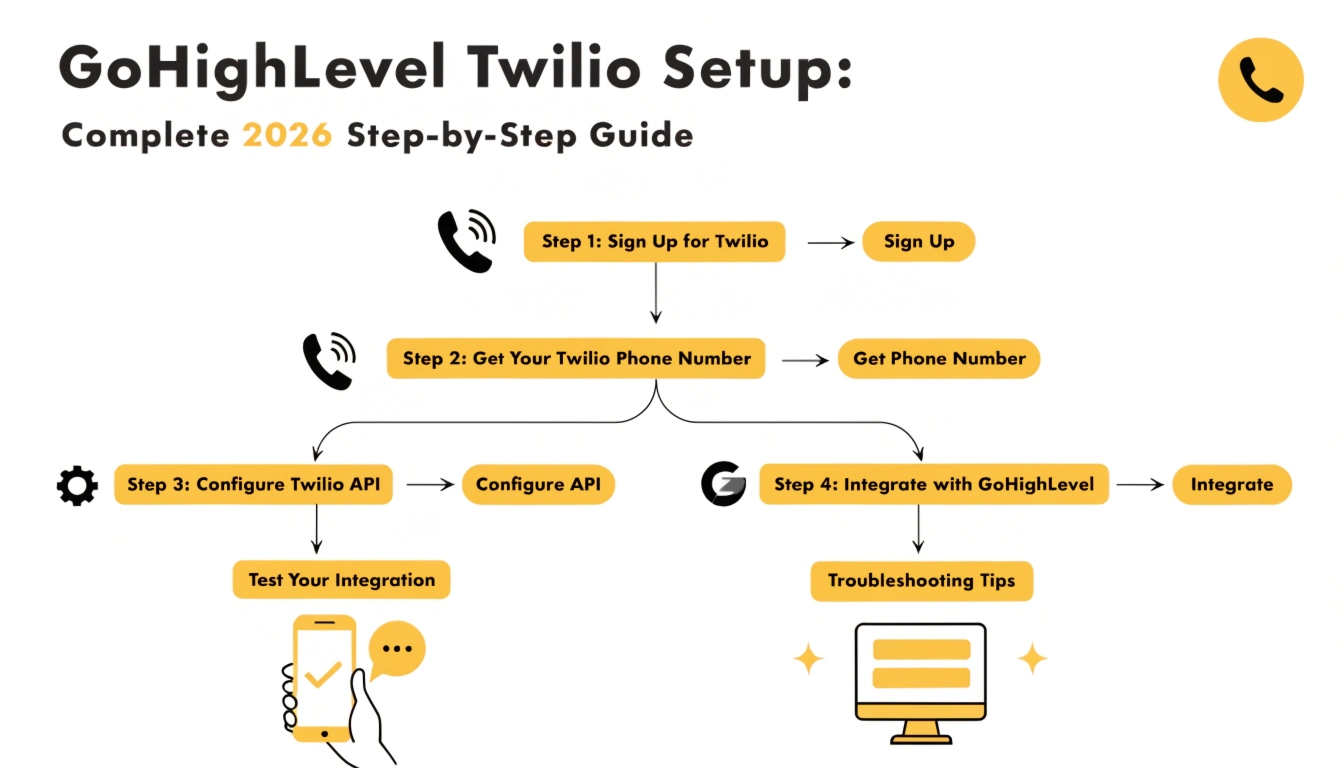
GoHighLevel Twilio Setup: Complete 2026 Step-by-Step Guide
GoHighLevel Twilio setup connects a Twilio account to your GoHighLevel sub-account so you can send SMS, make calls, and receive inbound messages through phone numbers you own and control. The setup takes 30-45 minutes for the basic configuration plus 1-3 weeks for A2P 10DLC registration before SMS will reliably deliver.
This guide walks through every step in order: creating your Twilio account, getting your credentials, connecting Twilio to GoHighLevel, purchasing a phone number, configuring your number for SMS and voice, and testing end-to-end.
Twilio vs LeadConnector: which should you use?
GoHighLevel offers two paths for SMS and voice. The first is connecting your own Twilio account directly. The second is using LeadConnector, GoHighLevel’s built-in service that runs on Twilio infrastructure but bills through HighLevel. Each has trade-offs.
LeadConnector is the simpler option. You don’t manage a separate Twilio account, billing flows through HighLevel, and the integration is preconfigured. The downside is slightly higher per-message costs and less granular control over routing and analytics.
Your own Twilio account gives you better unit economics at scale (especially over 5,000 messages/month), full access to Twilio’s advanced features (Verify, Studio, Voice IQ), and standalone analytics. The downside is a separate account to manage and a slightly more complex setup.
This guide covers connecting your own Twilio account, which is the right choice for most agencies and any business sending more than a few thousand messages per month. If you’d rather use LeadConnector, you can skip directly to purchasing a number inside GoHighLevel.
Read this: GoHighLevel for Real Estate 2026: The Ultimate Lead Conversion Engine
What you need before you start
Have these ready before opening Twilio:
Create your Twilio account
Go to twilio.com and click “Sign up.” Use your business email, set a strong password, and verify your email when the confirmation arrives. During account creation, Twilio asks a few qualifying questions. Answer honestly based on what you’ll actually do.
When asked what you’re building, select “SMS” and “Voice” (both, since most GoHighLevel users want both). When asked about your role, choose the option matching your business – typically “Owner” or “Marketing.” When asked about volume, give an honest estimate of your monthly send count.
Twilio will ask you to verify a phone number you control. Use your real business number – this is for account security, not for your sending number.
Upgrade your Twilio account from trial
New Twilio accounts start in trial mode, which restricts you to verified numbers only and prepends every message with “Sent from your Twilio trial account.” Neither works for production GoHighLevel use.
To upgrade, click your account name in the top right, choose “Upgrade,” and add a credit card with at least $20 of initial credit. The minimum top-up varies by region – $20 USD is typical for US accounts. Twilio will charge you immediately and credit the balance to your account.
Once upgraded, the trial restrictions lift. You can now send to any number, your messages won’t carry the trial prefix, and you can purchase production phone numbers.
Find your Twilio credentials
GoHighLevel needs two pieces of information from Twilio to connect: your Account SID and your Auth Token. These are like a username and password for your Twilio account.
From your Twilio Console homepage, look at the “Account Info” section on the right side. You’ll see:
Copy both values somewhere safe. The Auth Token is sensitive – treat it like a password. Never share it publicly, never paste it into a screenshot, and never store it in a public document.
Connect Twilio to your GoHighLevel sub-account
Log into your GoHighLevel sub-account (not the agency dashboard – the specific sub-account where you want to send SMS). Go to Settings – Phone Numbers – Integration.
Select “Twilio” as your provider. Paste your Account SID into the SID field and your Auth Token into the Auth Token field. Click “Save.”
GoHighLevel will verify the credentials by making a test call to Twilio’s API. If both fields are correct, you’ll see a green “Connected” status. If you see an error, the most common cause is a typo or a stray space at the start or end of one of the values – copy them again and try once more.
Purchase a phone number
With Twilio connected, you can now buy phone numbers through GoHighLevel that route through your Twilio account. Inside GoHighLevel, go to Settings – Phone Numbers – Add Number.
You’ll see search options for the type of number you want:
For most agencies and local businesses, a local number with an area code matching your business location is the right choice. Search for available numbers, pick one you like, and click “Buy.” Twilio charges a small monthly fee per number (typically $1-$2/month for local, $2-$5 for toll-free).
Configure your number for SMS and voice
By default, GoHighLevel configures your newly purchased number for both SMS and voice automatically. Verify the settings are correct:
Go to Settings – Phone Numbers – click your number. You should see configuration sections for:
If voice is disabled and you want to receive calls, toggle it on. If messaging is disabled, toggle it on. Save changes.
Start A2P 10DLC registration immediately
This is the step most setups get wrong. A2P 10DLC registration is required for your messages to actually deliver to US recipients – without it, carriers block your texts even though everything looks correct on your side. Registration takes 1-3 weeks, so start it the moment your number is purchased.
Inside GoHighLevel, go to Settings – Phone Numbers – Trust Center (or A2P 10DLC). Begin Brand registration with your exact legal business name, EIN, address, and website. Then start Campaign registration describing what messages you’ll send and how recipients opt in.
The complete A2P 10DLC walkthrough – including the use cases to pick, what sample messages get approved, and how to fix rejections – is covered in our dedicated GoHighLevel A2P 10DLC setup guide. Treat A2P registration as part of Twilio setup, not as a separate task to handle later.
Test your setup end-to-end
Once Twilio is connected and your number is configured, test both SMS and voice before building any workflows. Two quick tests:
SMS test: Inside a contact in GoHighLevel, send a manual test SMS to your own phone. Confirm the message arrives. If A2P is still pending approval, this test may be filtered – that’s expected. Once A2P approves, retest.
Voice test: From the same contact, place a test call from your GoHighLevel number to your phone. Answer it and confirm two-way audio works. If you hear yourself but the recipient hears nothing (or vice versa), there’s a configuration issue with your number’s voice settings.
If either test fails after A2P approval, work through our GoHighLevel email and SMS troubleshooting checklist for the next diagnostic steps.
Connect Twilio to a workflow
Twilio doesn’t need to be “connected” to each workflow separately – once it’s wired to the sub-account, every workflow that sends SMS or makes calls uses it automatically. To test a real workflow, build a simple one:
Go to Automation – Workflows – Create New. Add a trigger (e.g., “Contact Created”), then add a Send SMS action. Type a short test message. Save and publish. Add yourself as a contact. The workflow should fire, and the SMS should arrive on your phone within a few seconds.
If the workflow fires but the message doesn’t arrive, check three things: A2P registration status (still the most common cause), the contact’s SMS subscription status (“Opted Out” or “Bounced” will block the send), and the actual message content (carriers filter messages with suspicious links or spam-trigger phrases).
Common Twilio setup problems and fixes
“Authentication failed” when connecting
Your Account SID or Auth Token has a typo or extra whitespace. Re-copy both values from your Twilio Console, paste them into a plain text editor first to strip any hidden formatting, then paste into GoHighLevel.
“Insufficient funds” error when buying a number
Your Twilio balance is too low to cover the number’s monthly fee plus a small reserve. Add at least $20 to your Twilio balance through the Twilio Console and try again.
Phone number purchase fails with no clear error
The number you selected was bought by someone else between your search and your click. Twilio numbers are first-come-first-served. Search again, pick a different available number.
SMS sends but never arrives
The number-one cause is A2P 10DLC not registered or not approved. Check your Trust Center status. If approved, check the contact’s subscription status, then check message content for spam triggers, then check Twilio’s logs in the Twilio Console for any specific error code.
Voice calls connect but no audio
Voice configuration is incomplete. Inside the number’s settings in GoHighLevel, confirm Voice is enabled and the handler is set correctly. Also confirm your Twilio account has sufficient balance – Twilio sometimes silently restricts voice features below a minimum balance.
Twilio pricing for GoHighLevel users
Twilio bills separately from your GoHighLevel subscription, on a usage-based model. Typical costs as of early 2026:
Twilio pricing changes periodically and varies by destination. Confirm current rates at twilio.com/pricing before estimating volume costs. For most local-business GoHighLevel use cases, total Twilio costs land somewhere between $15 and $80 per month per number, depending on message and call volume.
Read this: GoHighLevel for Business: The 2026 Industry-Specific Operating System
Should you use multiple Twilio numbers?
Single-number setups work for most small operations. Multi-number setups make sense in three cases. First, if you have multiple business locations or service areas and want each to have a local-area number. Second, if you handle distinct audiences (e.g., a coaching business with both group-program and 1:1 lines) where separating reply streams matters. Third, if you’re approaching daily-throughput limits on a single number for high-volume sending.
Each additional number adds the monthly Twilio fee plus a separate A2P 10DLC campaign in most cases. Plan for that overhead before adding numbers.
Frequently Asked Questions
How do I connect Twilio to GoHighLevel?
Create a Twilio account, upgrade out of trial mode, copy your Account SID and Auth Token from the Twilio Console, then paste both into GoHighLevel under Settings – Phone Numbers – Integration. Select Twilio as your provider and save. Once verified, you can purchase phone numbers through GoHighLevel that route through your Twilio account.
How long does GoHighLevel Twilio setup take?
The basic Twilio connection takes 30-45 minutes: account creation, credential setup, number purchase, and end-to-end testing.
A2P 10DLC registration, which is required for SMS to reliably deliver, adds another 1-3 weeks waiting for carrier approval. Start A2P registration on the same day you set up Twilio to overlap the timelines.
Do I need my own Twilio account or can I use LeadConnector?
Both work. LeadConnector is simpler with billing through HighLevel and slightly higher per-message costs. Your own Twilio account gives better unit economics at scale (over 5,000 messages per month), access to advanced Twilio features, and standalone analytics.
Most agencies and higher-volume businesses use their own Twilio account; smaller operations often prefer LeadConnector’s simplicity.
Why is my GoHighLevel Twilio integration showing authentication failed?
This almost always means your Account SID or Auth Token has a typo or invisible whitespace from copy-paste. Re-copy both values from the Twilio Console, paste them into a plain text editor first to strip formatting, then paste into GoHighLevel.
The Account SID always starts with “AC” and is exactly 34 characters long; the Auth Token is exactly 32 characters.
How much does Twilio cost for GoHighLevel?
Twilio bills separately from GoHighLevel on usage. A local US number costs roughly $1-$2 per month, outbound SMS roughly $0.0083 per message, and outbound voice roughly $0.014 per minute.
Most local-business GoHighLevel users see total Twilio costs of $15-$80 per month per number. A2P 10DLC registration adds small monthly campaign fees on top.
Can I keep my existing business phone number when connecting Twilio?
Yes – you can port an existing number into Twilio rather than buying a new one. Porting takes 2-4 weeks and requires authorization from your current carrier.
Once ported, the number works through Twilio just like a newly purchased number. Keep in mind that during the port, the number can experience brief service interruptions, so plan around any periods where you cannot afford downtime.
Do I need A2P 10DLC if I’m only making calls, not sending SMS?
Voice-only use does not require A2P 10DLC registration. A2P 10DLC specifically governs business SMS delivery in the US. If your GoHighLevel setup uses Twilio purely for voice (inbound calls, AI Voice agents, outbound dialing without texting), you can skip A2P registration entirely. The moment you add SMS workflows, registration becomes required.
Need help getting Twilio set up correctly?
Connecting Twilio to GoHighLevel looks simple on paper, but the combination of authentication, number configuration, A2P registration, and DNS-style debugging trips up most first-timers. If your setup is failing, your messages aren’t delivering, or you’d rather skip the trial-and-error entirely, we handle Twilio configuration as part of every GoHighLevel setup we ship – including A2P registration done right the first time and end-to-end testing before handover.
Book a free GHL audit and we’ll review your current Twilio configuration, identify what’s broken if your SMS isn’t delivering, and get your workflows actually reaching customers. For any SMS-dependent business – chiropractors, contractors, mortgage brokers, fitness studios, insurance agents – getting this right is non-negotiable.