GoHighLevel Triggers Explained: Complete 2026 Reference Guide
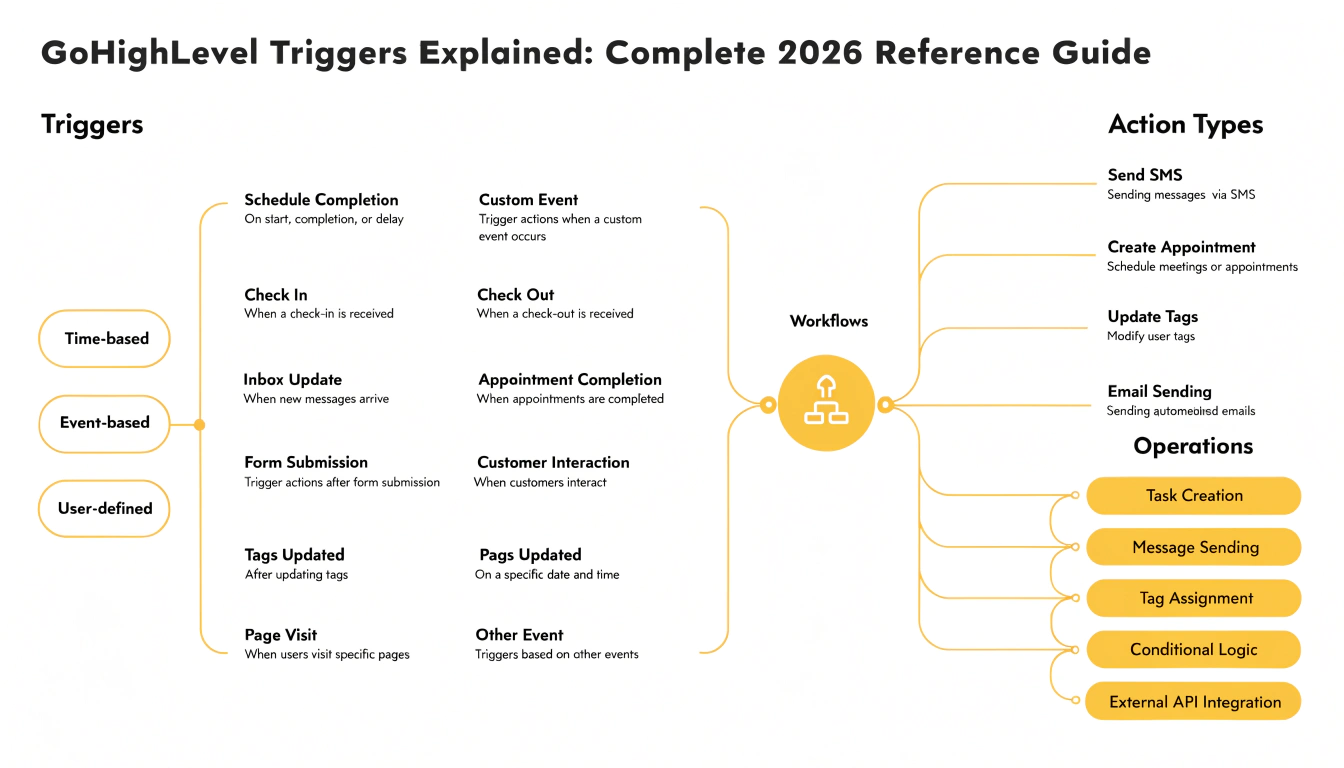
GoHighLevel triggers are the events that start a workflow – things like a contact being created, a form being submitted, a tag being added, or a calendar appointment being booked. There are around 30 different trigger types organized into seven categories: Contact, Form, Calendar, Payment, Pipeline, Communication, and Misc.
Each trigger has its own filters and configuration options that determine exactly when the workflow fires. This guide covers every trigger type, when to use it, the configuration mistakes that cause silent failures, and the right trigger to pick for the most common automation goals.
How triggers actually work in GoHighLevel
Triggers respond to events, not states. This distinction matters and is the source of most workflow confusion. A ‘Contact Created’ trigger fires when a new contact appears in your CRM – it does NOT fire for contacts that already existed before the workflow was built. A ‘Form Submitted’ trigger fires when someone submits the form going forward – it does NOT scan existing contacts who submitted the form last week.
Every trigger also has filters that narrow when it fires. A ‘Form Submitted’ trigger filtered to ‘Form is: Contact Us’ only fires for that specific form, not other forms on your site. A ‘Pipeline Stage Changed’ trigger filtered to a specific pipeline and stage only fires for that transition. Filters are powerful but easy to misconfigure – we covered the most common filter mistakes in our Workflow Not Triggering debug guide.
Workflows can have multiple triggers. If you want the same actions to run whether someone fills out Form A or Form B, add both as triggers rather than building two separate workflows. The actions run once per qualifying event regardless of which trigger fired.
Read this: GoHighLevel Calendar Setup: The Complete Step-by-Step Guide
Contact triggers
Contact triggers respond to events on the contact record itself – creation, updates, status changes, and tag operations. These are the most-used triggers across nearly every GoHighLevel setup.
Contact Created
Fires when a new contact is added to the sub-account. The contact can be created through forms, manual entry, imports, or API. Filter by source if you want different workflows for different acquisition channels (paid ads vs. organic vs. referral). Common use: welcome sequences and instant-response messages for new leads.
Contact Tag (Added/Removed)
Fires when a tag is added to or removed from a contact. Tags are the most flexible workflow connector in GoHighLevel – you can use them to gate complex multi-step processes. Common use: nurture sequences triggered by ‘Hot-Lead’ tag, drip campaigns triggered by category tags, or escalation when a ‘High-Priority’ tag is added by a team member.
Configuration mistake to avoid: tags are case-sensitive in some setups. ‘hot lead’ and ‘Hot Lead’ are different tags. Use consistent capitalization across your workflows and forms.
Contact DND (Do Not Disturb)
Fires when a contact’s DND status changes for a specific channel (email, SMS, voice). Common use: notification to your team when a contact opts out, or automatic pipeline movement to ‘Do Not Contact’ stage.
Contact Engagement Score Changed
Fires when a contact’s engagement score crosses a threshold you define. Useful for re-engagement workflows when scores drop, or VIP treatment when scores rise. Less commonly used because most teams don’t configure engagement scoring at the depth this trigger requires.
Customer Replied
Fires when a contact replies to an SMS or email you sent. Common use: pause an automated nurture sequence when a real conversation starts, or notify a team member to follow up personally. This is critical for any business using outbound nurture – without it, your automation keeps pushing while the lead is trying to talk to you.
Form triggers
Form triggers fire when someone submits a GoHighLevel form or survey. They’re separate from generic ‘Contact Created’ triggers because the same form can be filled out by existing contacts, in which case a Form Submitted trigger fires but Contact Created does not.
Form Submitted
Fires when any GHL form is submitted. Filter by form name to fire on specific forms only. Common use: route different forms to different sales pipelines (consultation form to ‘New Inquiries’ pipeline, demo request form to ‘Sales Qualified’ pipeline).
Survey Submitted
Same as Form Submitted but for GHL Surveys (the multi-step questionnaire builder). Used for application-style intake where qualification questions need conditional logic in the form itself.
Calendar triggers
Calendar triggers fire on appointment lifecycle events – booked, rescheduled, cancelled, no-show, completed. They’re the foundation of every reminder and follow-up automation tied to bookings. Calendar trigger details depend on your calendar configuration – the complete setup is covered in our GoHighLevel calendar setup guide.
Appointment Booked
Fires immediately when someone books an appointment on any GHL calendar. Filter by calendar to fire only for specific calendars. Common use: send the confirmation message, add the contact to a pre-call sequence, notify the assigned team member, move the contact to the right pipeline stage.
Appointment Status Changed
Fires when an appointment’s status changes (confirmed, cancelled, no-show, completed). Filter by status to fire only for specific transitions. The most useful filter is ‘No-Show’ – triggers your missed-appointment recovery sequence automatically.
Appointment Reminder
Fires at the time you’ve configured for reminders (1 hour before, 24 hours before, etc.). Used when you want the reminder to fire a workflow rather than just send a single message. Common use: complex multi-channel reminders that send via SMS, then check for reply, then fallback to email.
Payment triggers
Payment triggers fire on Stripe and PayPal events that GoHighLevel is watching. They’re essential for e-commerce, course sales, and any business with recurring billing – covered in more depth alongside our SaaS Mode and rebilling guides.
Read this: GoHighLevel Workflow Not Triggering? Here’s The Complete Debug Checklist
Order Submitted
Fires when a contact completes a purchase through a GHL order form. Common use: deliver the digital product, send the receipt and access instructions, add to a customer pipeline, trigger affiliate tracking.
Order FulfillCreated
Fires when a contact starts a recurring subscription. Common use: kick off the new-subscriber onboarding sequence and customer success workflows for SaaS or membership businesses.
Subscription Charge Failed
Fires when a recurring charge fails. Critical for recurring revenue – this is where you save customers from involuntary churn. Common use: send an immediate ‘update your card’ SMS with a one-click payment update link, notify your support team, and pause access if it stays unresolved after the configured grace period.
Pipeline triggers
Pipeline triggers fire on opportunity (deal) lifecycle events. They’re the engine of CRM-driven automation – moving leads through stages while triggering communication and team alerts at each transition.
Opportunity Created
Fires when a new opportunity is added to any pipeline. Filter by pipeline name to fire only for specific pipelines. Common use: assign the opportunity to a team member, send the contact a ‘we received your inquiry’ confirmation, notify your sales team in Slack.
Pipeline Stage Changed
Fires when an opportunity moves from one stage to another. Filter by both pipeline and target stage to fire only on specific transitions. This is one of the most powerful triggers in GoHighLevel – it lets you automate the entire sales process based on where each opportunity sits. Common use: when stage moves to ‘Proposal Sent’, start the follow-up sequence; when stage moves to ‘Closed Won’, start the onboarding sequence.
Opportunity Status Changed
Fires when an opportunity’s status changes (Open, Won, Lost, Abandoned). Used for global win/loss workflows that should fire regardless of which pipeline the opportunity sat in. Common use: celebrate wins with the team, run a brief survey on losses to capture feedback.
Communication triggers
Communication triggers fire on inbound and outbound message events – SMS, email, voice, WhatsApp. They’re how you make automation feel responsive to real conversations rather than running blindly. SMS and voice trigger reliability depends on your Twilio configuration.
Email Events (Opened/Clicked/Bounced)
Each event has its own trigger. Common use: tag contacts who click a specific link with their interest (e.g., ‘Interested-Pricing’ or ‘Interested-Demo’), then route them to interest-specific nurture. Bounce triggers can automatically tag contacts with ‘Bad-Email’ and pause future email sends.
SMS Events (Replied)
Fires when a contact replies to an SMS. The single most important trigger for SMS-heavy businesses – without it, your automation keeps texting people who are trying to have a real conversation with you. Always pause active sequences when SMS Replied fires.
Call Status (Completed/Missed/Voicemail)
Fires on inbound call lifecycle events. Common use: when a call is missed, automatically text the caller within seconds (‘Sorry we missed your call. We can have a tech back to you within an hour – what’s the best time?’). This single workflow captures a meaningful percentage of leads that would otherwise drop.
Misc triggers
The catch-all category for triggers that don’t fit elsewhere – notes, tasks, custom values, and inbound webhooks from external systems.
Note Added
Fires when a note is added to a contact (manually by a team member or via API). Common use: route follow-up tasks based on what the note contains, or escalate to a manager when a note tagged with ‘Complaint’ is added.
Task Added/Completed
Fires when a task is created or marked complete. Used for team workflow automation – when a sales rep completes their qualifying-call task, the workflow automatically creates the proposal task for the next phase.
Custom Webhook
Fires when an external system sends an HTTP request to your unique GoHighLevel webhook URL. The most flexible trigger – it lets you integrate with any tool that can send a webhook. Common use: bridging Calendly bookings, Typeform submissions, or custom apps into your GHL workflows.
Configuration note: webhook triggers require proper payload mapping. The data your external system sends must include either an email or phone number for GoHighLevel to identify or create the contact. Without that, the workflow fires but cannot attach to any contact record.
Inbound Webhook (Legacy)
The older webhook trigger format. Functions identically to Custom Webhook but uses a slightly different URL structure. For new workflows, use Custom Webhook. For older workflows that already use Inbound Webhook, no need to migrate unless you’re experiencing issues.
Choosing the right trigger for common goals
Many automation goals can be achieved with multiple triggers, but one is usually the cleanest choice. Below are the common scenarios and the best trigger for each.
Goal: Welcome a new lead immediately
Best trigger: Contact Created, filtered by source if the welcome differs by acquisition channel. Avoid ‘Form Submitted’ if leads can come from multiple sources you want to handle uniformly.
Goal: Confirm an appointment was booked
Best trigger: Appointment Booked, filtered by the specific calendar. Don’t use Contact Tag with a ‘Booked’ tag – too easy for the tag to get added manually and fire your confirmation flow incorrectly.
Goal: Win-bacfailed subscription charge
Best trigger: Subscription Charge Failed. Don’t try to detect this with other triggers – this one fires specifically for payment events and gives you the exact contact and subscription context.
Goal: Pause nurture when a contact replies
Best trigger: SMS Replied (for SMS sequences) and Customer Replied (for email-based sequences). Add ‘Remove from workflow’ or ‘Mark sequence complete’ as the first action.
Goal: Move opportunity to next stage automatically
Best trigger: Pipeline Stage Changed, filtered to the source stage. Then the action moves the opportunity forward. Avoid building this with multiple Contact Tag triggers – stages are designed for this exact use case.
Common trigger configuration mistakes
These are the configuration errors we see most often in GHL workflow audits.
Trigger fires for events that already happened
Triggers respond to events going forward, never retroactively. If you build a ‘Contact Created’ workflow today, it does not fire for contacts created yesterday. To run a workflow against existing contacts, use Bulk Actions in the Contacts tab to manually add them – or create a tag, apply it via bulk action, and trigger on Contact Tag Added.
Read this: GoHighLevel Twilio Setup: Complete 2026 Step-by-Step Guide
Missing or wrong filters
A ‘Form Submitted’ trigger with no filter fires for every form on your site. A ‘Pipeline Stage Changed’ trigger with no pipeline filter fires for every pipeline. Always set explicit filters for triggers that should fire only in specific contexts.
Multiple triggers when one would do
Building three separate workflows for ‘Form A submitted’, ‘Form B submitted’, and ‘Form C submitted’ when all three should run the same actions is a maintenance nightmare. Use one workflow with three triggers (or one trigger with no form filter and a filter-step at the start).
Tag triggers without case consistency
Tag triggers are case-sensitive. Using ‘hot lead’ in your forms but ‘Hot Lead’ in your trigger filter silently breaks the workflow. Pick one capitalization standard and enforce it everywhere – all lowercase is the safest default.
Webhook triggers without identifier
Custom Webhook triggers need email or phone in the payload to attach the workflow to a contact. Webhooks that send only custom data with no identifier fire the workflow but cannot find or create a contact, so subsequent actions silently fail.
Frequently Asked Questions
How many triggers can a GoHighLevel workflow have?
A single workflow can have multiple triggers. There’s no official limit on the number, but practical clarity drops above 5-6 triggers per workflow. If you’re using more, consider whether the workflow should be split into separate workflows with overlapping triggers and shared actions.
Can a workflow trigger on multiple events?
Yes. Add multiple triggers to the same workflow and any matching event fires the same downstream actions. This is the right pattern when you want identical behavior regardless of how the contact entered the workflow – for example, when a new contact comes in via form submission OR by being created manually by a team member.
Why is my GoHighLevel trigger not firing?
The most common reasons are the workflow is in Draft mode rather than Published, the trigger filter is excluding the contact, the trigger event never actually happened, or the contact already went through the workflow once and re-entry is blocked. We cover the complete 10-step debug in our workflow not triggering guide.
What’s the difference between Contact Created and Form Submitted triggers?
Contact Created fires when a new contact is added to your CRM through any source – forms, manual entry, imports, or API. Form Submitted fires specifically when a GoHighLevel form is submitted, including by contacts that already exist. If an existing contact fills out the form again, Form Submitted fires but Contact Created does not.
Do GoHighLevel triggers work retroactively?
No. Triggers respond to events going forward in time. Building a new workflow today does not fire it for contacts created yesterday. To process existing contacts, use Bulk Actions to manually add them to the workflow, or apply a tag via bulk action and trigger on Contact Tag Added.
Can I trigger a GoHighLevel workflow from an external app?
Yes, via the Custom Webhook trigger. GoHighLevel generates a unique webhook URL for the workflow. Your external app sends an HTTP POST to that URL with a JSON payload that must include either email or phone for contact identification. Common use: Calendly bookings, Typeform submissions, custom CRM events, or integrations through Zapier/Make.com.
What’s the most-used GoHighLevel trigger?
Contact Created is the most common across virtually every GHL setup – it’s the foundation of welcome sequences and instant-response automation. Pipeline Stage Changed comes second because it powers CRM-driven sales automation. Form Submitted is third, used for routing form-specific responses.
Need help configuring the right triggers?
Triggers look simple on paper. In practice, building a setup where every workflow fires reliably, no trigger overlaps with another, and edge cases don’t break the system takes experience. If you’d rather have your GoHighLevel automation architected by someone who has built hundreds of these, our setup service handles the full workflow design – including the trigger map, the testing protocol, and the documentation your team needs to maintain it after launch.
Book a free GHL audit and we’ll review your current trigger configuration, identify any silent failures, and quote a complete workflow rebuild if needed. Most agencies discover at least one trigger that’s been quietly broken – usually a Customer Replied or SMS Replied trigger that should have been pausing sequences and isn’t.