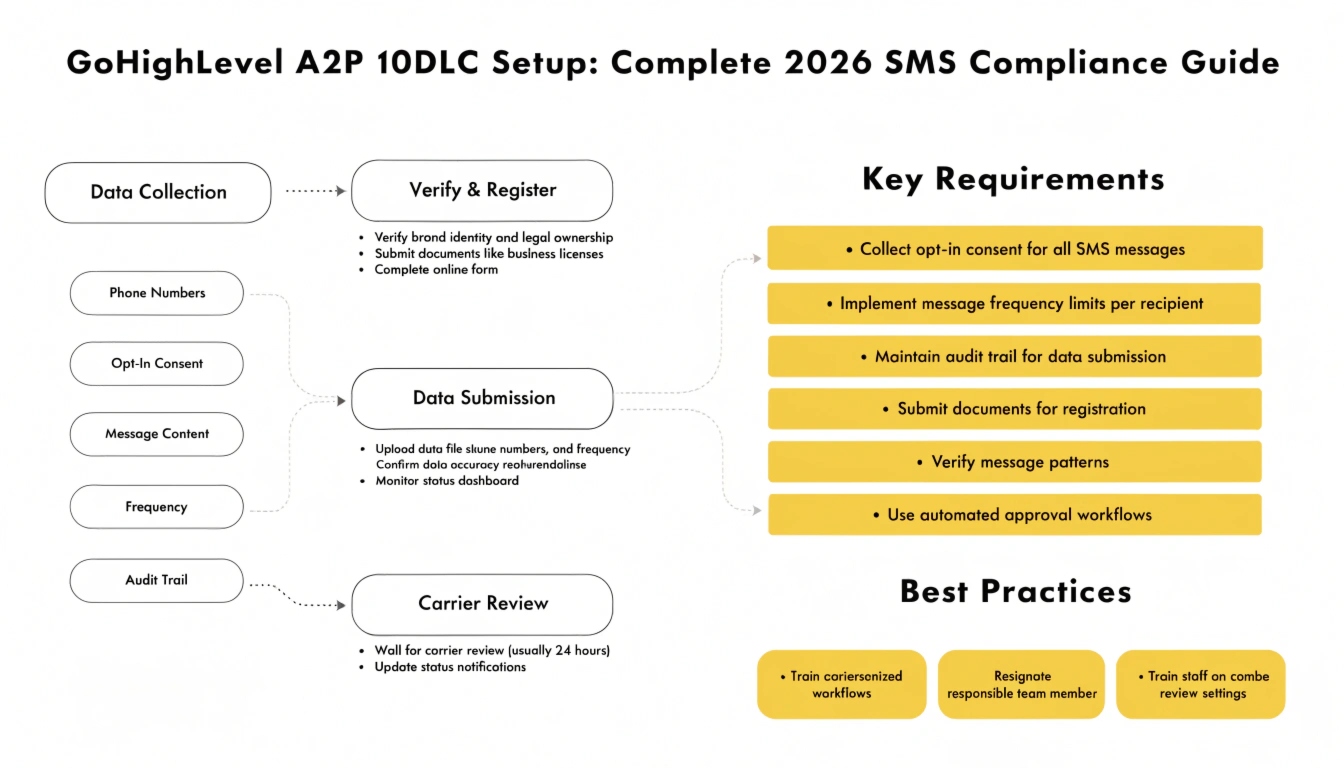
GoHighLevel A2P 10DLC Setup: Complete 2026 SMS Compliance Guide
A2P 10DLC registration is the mandatory carrier-level process that authorizes your GoHighLevel account to send business text messages over standard 10-digit phone numbers. Without it, carriers like Verizon, AT&T, and T-Mobile silently block or heavily filter your texts. Registration involves two steps: registering your business as a Brand, then registering your messaging Campaign.
The full process takes 1-3 weeks and must be completed before any SMS workflow can reliably deliver. This guide walks through every step, including what to do when your registration gets rejected.
What is A2P 10DLC, and why does GoHighLevel require it?
A2P 10DLC stands for Application-to-Person 10-Digit Long Code. In plain terms: it’s the system US mobile carriers built to verify that businesses sending automated text messages from standard phone numbers are legitimate. “A2P” means messages sent by an application (like GoHighLevel) rather than person-to-person. “10DLC” refers to the standard 10-digit phone numbers businesses use.
Before A2P 10DLC, businesses sent automated SMS through regular phone numbers with no verification, and spam was rampant. In 2021-2022, the major US carriers began requiring all business SMS senders to register. By 2026, registration is fully enforced — unregistered traffic is blocked, not just throttled.
GoHighLevel sends SMS through Twilio (or LeadConnector, which is GoHighLevel’s Twilio-based phone system). Both require A2P 10DLC registration before your messages will deliver to US recipients. This isn’t optional, and it isn’t something GoHighLevel can waive — it’s a carrier requirement that sits above the platform.
Read this: Certified GoHighLevel Admin: What the Certification Actually Means in 2026
What happens if you skip A2P 10DLC registration?
This is the single most common reason new GoHighLevel users think SMS “doesn’t work.” Here’s exactly what happens when you send SMS without registration:
Because the failure is silent, brokers and agencies often spend days troubleshooting workflows and integrations when the real problem is simply that A2P registration was never completed. Always register before launching SMS workflows.
The two parts of A2P 10DLC registration
A2P 10DLC registration has two distinct components. You must complete both, in order.
Brand registration
Brand registration verifies your business is real. You submit your legal business name, EIN (or business registration number), business address, website, and contact details. The carrier registry (The Campaign Registry, or TCR) verifies this information against public records. A verified brand gets a “trust score” that affects your messaging throughput limits.
Campaign registration
Campaign registration describes what kind of messages you’ll send and how recipients opted in. You select a use case (e.g., “Customer Care,” “Marketing,” “Mixed”), describe your message flow, provide sample messages, and explain how contacts consent to receive texts. Carriers review this to confirm your messaging is legitimate and consented.
Step-by-step: GoHighLevel A2P 10DLC registration
The registration happens inside your GoHighLevel sub-account. Here’s the complete walkthrough.
Navigate to the registration area
In your GoHighLevel sub-account, go to Settings → Phone Numbers → Trust Center (or “A2P 10DLC” depending on your interface version). If you don’t see a phone number yet, you’ll need to purchase one first through Settings → Phone Numbers → Add Number.
Gather your business information
Before you start, have these ready — having them wrong is the top cause of rejection:
Complete brand registration
Enter your business details exactly as they appear in official records. The most common rejection reason is a mismatch between the name or EIN you enter and what the IRS has on file. If your LLC is “Acme Marketing Solutions LLC,” don’t enter “Acme Marketing” — enter the full legal name. Submit the brand and wait for verification, which usually takes a few minutes to a few hours.
Read this: How Much Does a GoHighLevel Agency Cost? The 2026 Transparent Pricing Guide
Choose your campaign use case
Select the use case that matches your actual messaging. The common options:
Most local businesses and agencies select “Mixed” or “Low Volume Mixed.” Choosing accurately matters — describing yourself as Customer Care but sending marketing texts can get your campaign suspended later.
Write your campaign description and sample messages
This is where most registrations get rejected. The carriers want to see exactly what you’ll send and that recipients consented. Provide clear, specific sample messages that match your use case. Vague or placeholder samples get rejected.
A strong sample message includes your business name and an opt-out instruction. Example for an appointment-reminder campaign:
Provide 2-3 sample messages covering the different message types you’ll actually send. Each should be realistic, not generic filler.
Submit and wait
After submitting the campaign, it goes to The Campaign Registry and the carriers for review. Timelines vary: brand verification is usually fast (minutes to hours), but campaign approval typically takes 1-3 weeks. Some use cases and low-volume campaigns approve faster. During this window, do not launch SMS workflows — they won’t deliver reliably until approval lands.
Confirm approval and test
Once your campaign status shows “Approved” or “Active” in the Trust Center, send a test SMS from a workflow to your own phone. Confirm it arrives. If it does, your registration is complete and you can launch your SMS workflows. If it doesn’t, work through our GoHighLevel email and SMS troubleshooting checklist for the next diagnostic steps.
Sole proprietors: the special case
If you don’t have an EIN — for example, you’re a sole proprietor operating under your own name — the registration path differs. Sole proprietor registration uses a special low-throughput campaign type with stricter daily message limits (typically capped well below registered businesses). You’ll provide your personal identification and a mobile number for verification via a one-time code.
The honest recommendation: if you’re running any serious volume of SMS, get an EIN. It’s free from the IRS, takes about 10 minutes online, and unlocks standard brand registration with much higher throughput. The sole-proprietor path works for very low volume but throttles quickly.
Why A2P 10DLC registrations get rejected (and how to fix each)
Rejection is common on first submission. Here are the top reasons and the fix for each.
R Business name or EIN mismatch
The name or EIN you entered doesn’t match IRS/state records. Fix: verify your exact legal name on your IRS EIN confirmation letter (CP 575) and re-submit with the precise match, including “LLC,” “Inc.,” or other suffixes.
Rejection 2: Website doesn’t describe the business
Your website is down, under construction, or doesn’t clearly explain what your business does. Fix: ensure your site is live, loads properly, and has a clear description of your services plus contact information. A privacy policy mentioning SMS helps.
Rejection 3: Sample messages too vague
Samples were generic placeholders like “Hello, this is a test message.” Fix: write realistic samples that include your business name and a STOP opt-out, matching your actual use case (see Step 5).
Rejection 4: Opt-in process unclear or non-compliant
Your opt-in description didn’t show genuine consent. Fix: describe a specific, documented opt-in method — a form checkbox with explicit consent language, or a documented verbal opt-in process. Include the exact consent language you use.
Rejection 5: Use case mismatch
Your stated use case doesn’t match your sample messages (e.g., “Customer Care” use case but promotional sample messages). Fix: align your use case with your samples, or switch to “Mixed” if you genuinely send both types.
A2P 10DLC costs
Registration carries small fees, separate from your GoHighLevel subscription. As of 2026, typical costs are a one-time brand registration fee (around $4-$44 depending on brand type), a monthly campaign fee (typically $1.50-$10/month depending on use case), and a one-time campaign vetting fee for some use cases.
These fees are charged through your Twilio/LeadConnector account, not your GoHighLevel plan. The exact amounts shift as carriers update their pricing, so confirm current fees in your Trust Center before registering.
Read this: Done-For-You GoHighLevel Setup: When It Makes Sense for Your Business
How long does the whole process take?
Plan for 1-3 weeks end to end. Brand verification is usually same-day. Campaign approval is the variable part — standard campaigns take 1-2 weeks, sometimes up to 3. Low Volume Mixed campaigns often approve faster. If you get rejected and resubmit, add another 1-2 weeks. The practical takeaway: start A2P registration on day one of any GoHighLevel setup, before building anything else, so it’s approved by the time your workflows are ready.
Best practices to keep your A2P campaign healthy
Frequently Asked Questions
What is A2P 10DLC in GoHighLevel?
A2P 10DLC is the carrier-mandated registration that authorizes GoHighLevel to send business SMS over standard 10-digit phone numbers.
It verifies your business (Brand registration) and your messaging type and consent (Campaign registration). Without it, US carriers block your texts. GoHighLevel sends SMS through Twilio, which requires this registration before messages will deliver.
How long does A2P 10DLC registration take in GoHighLevel?
Brand verification usually completes within minutes to a few hours. Campaign approval typically takes 1-3 weeks, depending on the use case and carrier review queues.
Low Volume Mixed campaigns often approve faster. If your registration is rejected and you resubmit, add another 1-2 weeks. Start registration before building your SMS workflows.
Why are my GoHighLevel texts not sending after registration?
If texts still fail after A2P approval, check four things: confirm the campaign status shows ‘Approved’ or ‘Active,’ verify the sending number is linked to the approved campaign, check the contact isn’t opted out, and confirm the workflow is actually firing. Most post-registration SMS issues are workflow trigger problems rather than registration problems.
Do I need an EIN for A2P 10DLC registration?
An EIN unlocks standard brand registration with higher messaging throughput. Sole proprietors without an EIN can register through a special low-throughput path with stricter daily limits and identity verification via a one-time code. For any serious SMS volume, getting an EIN (free from the IRS, about 10 minutes online) is strongly recommended.
How much does A2P 10DLC cost in GoHighLevel?
A2P 10DLC carries small fees separate from your GoHighLevel subscription: a one-time brand registration fee (roughly $4-$44), a monthly campaign fee (typically $1.50-$10), and sometimes a one-time vetting fee. These are billed through your Twilio/LeadConnector account. Confirm exact current amounts in your Trust Center, as carrier pricing changes periodically.
Why was my A2P 10DLC campaign rejected?
The most common rejection reasons are: business name or EIN mismatch with official records, a website that doesn’t clearly describe your business, vague sample messages, an unclear opt-in process, or a use case that doesn’t match your sample messages.
Each is fixable — correct the specific issue and resubmit. Realistic sample messages with STOP language and a documented opt-in process resolve most rejections.
Can I send SMS in GoHighLevel without A2P 10DLC?
Not reliably. Without A2P 10DLC registration, US carriers block or heavily filter your messages — they appear ‘Sent’ in GoHighLevel but never reach recipients.
Continued unregistered sending can get your number suspended. International messaging rules differ, but for any US business SMS, registration is mandatory.
Need help getting your A2P 10DLC approved?
A2P 10DLC registration is one of those tasks that’s simple when you’ve done it dozens of times and frustrating when it’s your first. If your campaign keeps getting rejected, or you’d rather skip the trial and error, we handle A2P registration as part of our GoHighLevel setup service — including brand registration, campaign descriptions written to pass on the first submission, and compliant opt-in flows.
Book a free GHL audit and we’ll review your current registration status, identify why a rejection happened if you’ve had one, and get your SMS delivering reliably. For SMS-dependent businesses like mortgage brokers, contractors, and clinics, getting this right is the difference between workflows that work and workflows that silently fail.