GoHighLevel for Home Services: The Always-On Contractor Blueprint
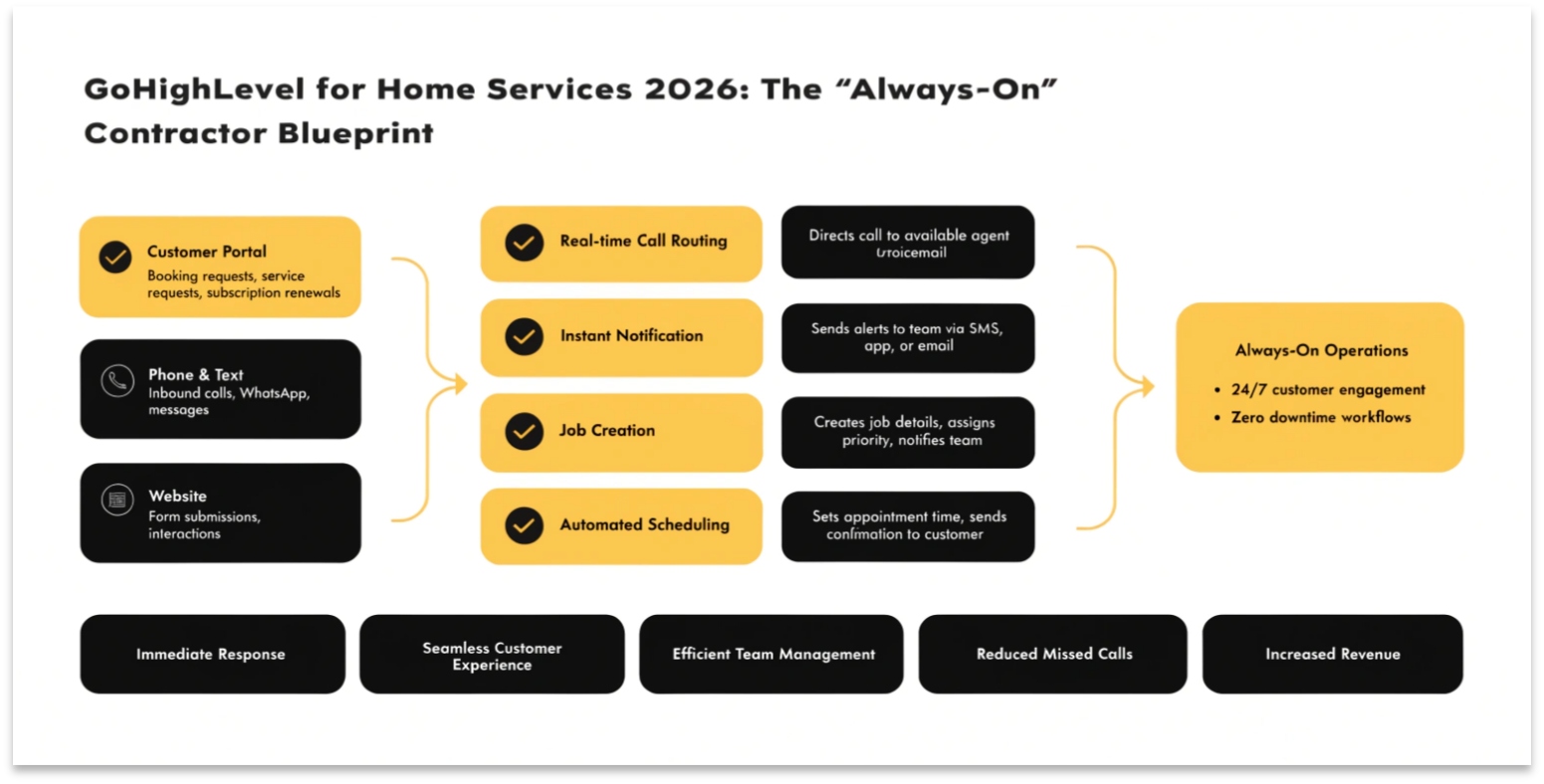
GoHighLevel for home services contractors is a 24/7 lead capture and dispatch platform — handling missed calls with AI Voice, booking emergency jobs after-hours, automating review collection, and routing leads to available technicians.
The single biggest revenue leak in home services isn’t competition; it’s missed calls. Studies consistently show 27-40% of contractor leads happen outside business hours, and most go to whoever answers first. GoHighLevel closes that gap.
This guide covers the complete contractor setup, from AI receptionist to job-completion automation.
The missed-call problem
Here’s the math that defines home services in 2026. The average residential service lead costs $35-$120 to generate through Google Local Services Ads or paid search. Your closing rate on connected leads runs 25-45%. Your closing rate on leads that go to voicemail runs 0-3%.
If 30 percent of your leads call after hours and you have no after-hours capture, you’re paying full price for leads that never connect. A typical mid-size HVAC company with $80K monthly revenue is leaving $30K-$50K monthly on the table to whoever answers first.
The GoHighLevel home services setup exists to capture every one of those calls.
Read this: GoHighLevel for Business: The 2026 Industry-Specific Operating System
After-hours lead capture: AI Voice agent setup
GoHighLevel’s AI Voice agent answers calls 24/7 in a natural-sounding voice you customize. When a homeowner calls at 11 PM with a burst pipe or a broken AC, the AI greets them, gathers the service issue, captures their name and address, and either books an emergency dispatch or schedules a follow-up call for the morning.
The setup involves three pieces: a Twilio phone number routed through GoHighLevel, an AI Conversation script trained on your service categories, and workflows that route the captured information to your on-call technician via SMS. For most contractors, the full setup takes 7-14 days.
SMS booking flows
After hours, voice isn’t always the right channel. Many homeowners prefer to text. A common workflow: homeowner sees your Google ad, clicks the SMS option, sends “AC not working.” An automated flow responds within seconds: “Sorry to hear that. We can have a tech out today between 8 AM-5 PM. What’s your address?”
Address captured, appointment booked, technician notified — all without human intervention until the truck rolls.
Job-site to invoice automation
Once the job is dispatched, GoHighLevel pipelines track it through completion. Stages typically map to: Dispatched → On Site → Diagnosis Complete → Quote Approved → Job In Progress → Job Complete → Invoiced → Paid. Each stage triggers automation.
Multi-tech dispatch workflows
Multi-tech operations need routing logic. GoHighLevel handles this through workflow conditional branching. Incoming lead has zip code → workflow checks which tech covers that zone → SMS sent to that tech → if no response in 5 minutes, escalate to backup tech → if still no response, alert dispatcher via Slack.
This level of routing typically requires either an internal dispatcher full-time or an expensive field service management platform like ServiceTitan ($350+/month). GoHighLevel handles the dispatch routing within the standard $97-$297/month subscription.
Review velocity for local SEO
Home services local SEO depends on Google review count and recency more than almost any other industry. The contractor with 200 reviews in the last 12 months outranks the contractor with 800 reviews from 2018.
GoHighLevel’s review request automation triggers 24 hours after job completion. Patient gets an SMS: “Thanks for choosing . If you’d take 30 seconds to leave a Google review, it would mean everything.” Most contractors using this workflow add 8-15 new Google reviews per month — enough to significantly improve local search rankings within 6 months.
Integration with QuickBooks and ServiceTitan
Most home services operations use QuickBooks for accounting and either ServiceTitan, Housecall Pro, or Jobber for field service management.
GoHighLevel doesn’t replace these — it integrates with them. The typical setup uses GHL for marketing and lead capture, with leads passed via Zapier or Make.com to your FSM tool when the job is booked.
Real revenue example
One of our HVAC clients in Texas had $145K monthly revenue before GoHighLevel. They were missing roughly 22% of their inbound calls due to after-hours and busy-line drops.
After implementing the AI Voice agent and SMS booking flows over 14 days, their captured-lead rate jumped to 91%. Three months after launch, monthly revenue had grown to $189K — entirely from previously-lost calls now being captured.
Read this: GoHighLevel for Real Estate 2026: The Ultimate Lead Conversion Engine
Frequently Asked Questions
Can GoHighLevel handle multiple technicians and dispatch?
Yes. GoHighLevel uses workflow conditional branching to route leads based on service area, technician availability, and job priority.
Multi-tech setups typically include zone-based routing, on-call rotation, and escalation paths. Setup is included in our home services GHL configuration service.
Does GoHighLevel integrate with QuickBooks?
Yes, via Zapier or Make.com. The typical setup syncs new GHL contacts to QuickBooks customers when a job is booked, and pushes invoice data back to GHL when payments are received.
For more advanced sync (real-time bidirectional), custom integrations can be built using GHL’s API and webhook system.
How do contractors capture after-hours leads with GoHighLevel?
After-hours lead capture uses two GHL features: AI Voice agents that answer calls 24/7 with natural-sounding voice and book emergency dispatches, and SMS booking flows that respond to text messages with automated qualification questions. Both run through your existing Twilio phone number and require no additional staff.
What about emergency dispatch — can GoHighLevel handle real urgency?
Yes. Emergency workflows use higher-priority routing — the AI immediately texts the on-call technician and dispatcher with the homeowner’s address, issue, and contact info. If the technician doesn’t respond in 5 minutes, the workflow escalates to a backup tech. If still no response, it alerts the owner directly.
How long does a home services GoHighLevel setup take?
A complete home services GHL setup takes 14-21 business days, depending on whether AI Voice is included. The base setup (workflows, pipelines, SMS booking, review automation) takes 14 days.
Adding AI Voice with custom training adds 7 days. Multi-location setups with multiple sub-accounts add another 7-10 days.
Ready to capture every after-hours lead?
Book a free contractor GHL audit. We’ll review your current call capture rate, identify how many leads you’re losing after hours, and quote a complete GHL setup tuned to your service mix. Most contractors recoup the setup cost within 30-45 days from previously-missed leads.