GoHighLevel Email Deliverability 2026: The Ultimate Spam-Filter Blueprint
In 2026, an email that lands in the “Promotions” or “Spam” folder is a wasted asset. With billions of emails sent daily via the GoHighLevel ecosystem, mailbox providers have tightened the screws. If your GoHighLevel Email Deliverability 2026 strategy consists of just hitting “Send,” you are likely seeing open rates below 10%.
To achieve the “ghlcrm.me” standard of efficiency, you must master the technical side of the LeadConnector (LC) email system. It’s no longer about volume; it’s about Sender Reputation. This guide breaks down exactly how to verify your domains and warm up your accounts to ensure 99% deliverability.
Why the “Shared IP” Era is Over in 2026
When you first start with GHL, you are often on a shared IP pool. While this is fine for low-volume testing, scaling an agency requires a Dedicated Sending Domain. In 2026, AI filters look at the “Digital Signature” of every email. If you are sharing space with a “spammer,” your deliverability will suffer.
By moving to a dedicated domain, you take full control of your reputation. You are telling Google and Yahoo: “This is my mail, and I take responsibility for it.”
The “Triple Threat” Verification (SPF, DKIM, DMARC)
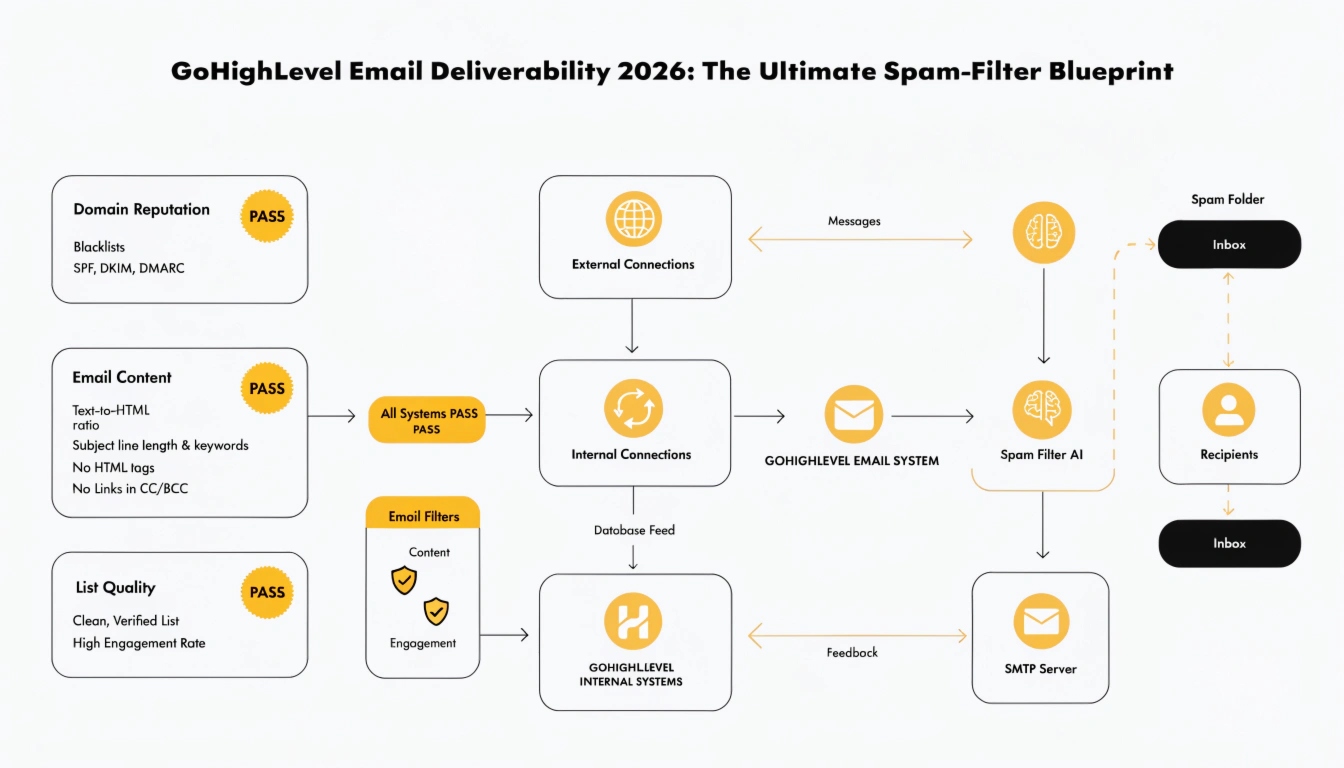
To rank on the 1st page of deliverability in 2026, your DNS settings must be perfect. These are the three pillars of White-Label Domain Setup for email:
How to Configure GHL Email for Maximum Reach (Step-by-Step)
Set Up Your Dedicated Domain
Navigate to Settings > Email Services > Dedicated Domains. Avoid using your main website domain (e.g., https://www.google.com/search?q=mail.yourbrand.com instead of yourbrand.com). This protects your main domain if a specific campaign hits a spam trap.
The 14-Day Warm-Up Sequence
Never send 1,000 emails on day one. GHL now includes automated Warm-Up Workflows. Start with 20 emails to your most engaged leads, and let the system incrementally increase the volume over two weeks. This builds “Positive Momentum” with inbox providers.
Hygiene and List Cleaning
In 2026, a high “Bounce Rate” is a death sentence. Before importing any list, use the native Smart Lists feature to filter out invalid addresses. Only send to leads who have opted in within the last 90 days.
3 Critical Deliverability Tactics for 2026
| Tactic | Why It Works | Implementation |
| Engagement-Based Triggers | Prevents “Spammy” behavior. | Stop sending to leads who haven’t opened your last 5 emails. |
| AI Content Variation | Avoids “Fingerprinting.” | Use Content AI to vary your subject lines automatically. |
| Two-Way Reply Signals | High Trust Signal. | Encourage replies. A reply is the #1 way to tell a filter your mail is valuable. |
Real-World Use Case: The 45% Open Rate Turnaround
A dental marketing agency was struggling with 12% open rates for their appointment reminders.
Best Practices for 2026
FAQs
Should I use Mailgun or LeadConnector?
In 2026, LeadConnector (LC) Email is the superior choice for most. It is built on top of Mailgun technology but integrates natively with GHL, making the SaaS Mode rebilling and domain setup much simpler.
How do I fix a “Blacklisted” domain?
Stop all sending immediately. Verify your DMARC records, clean your lists using a service like NeverBounce, and reach out to GHL support to request an IP shift.
Does GHL help with A2P 10DLC compliance?
Yes, for SMS. For email, it ensures you follow the CAN-SPAM and GDPR guidelines by providing automated opt-out headers.
Conclusion
Mastering GoHighLevel Email Deliverability 2026 is the difference between a scaling agency and one that is struggling to stay afloat. By focusing on technical verification, gradual warm-ups, and lead hygiene, you ensure that your message always reaches the person who needs to hear it. Don’t let your hard work end up in the “Trash” folder—verify your domain today.
Ready to fix your inbox rates? Head over to Settings > Email Services and check your “Dedicated Domain” status right now!