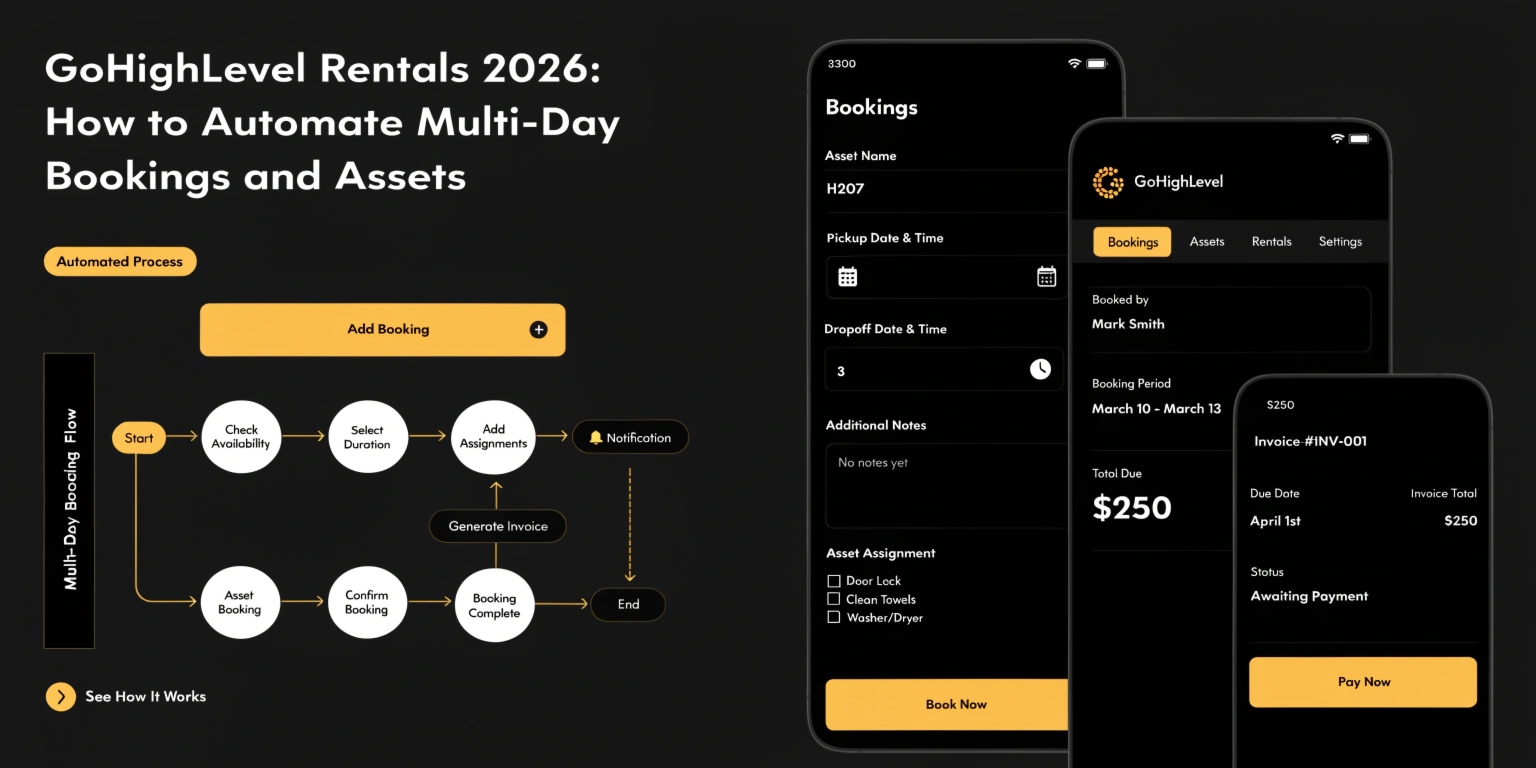
GoHighLevel Rentals 2026: How to Automate Multi-Day Bookings and Assets
For years, GoHighLevel was the king of “time-based” bookings—like a 30-minute haircut or a 1-hour coaching call. But in 2026, the game has changed. With the release of GoHighLevel Rentals, you can now manage “asset-based” bookings that last for days, weeks, or even months.
Whether you are renting out Airbnb properties, luxury cars, or heavy construction equipment, this new system allows you to handle inventory, pricing, and deposits all in one place.
What is the Rentals Feature?
The Rentals system is a new type of calendar designed for physical items rather than just people’s time.
Key Features in 2026:
Read this: GoHighLevel Communities 2026: Build, Gamify, and Monetize Your Audience
Advanced Pricing & Security Deposits
In 2026, rental pricing is no longer “one size fits all.” You can set complex rules to maximize your profit.
Pricing Strategies You Can Use:
| Rule Type | How it Works | Example |
| Duration-Based | Cheaper rates for longer stays. | $100/day for a week, $80/day for a month. |
| Seasonal Pricing | Higher rates during holidays. | 2x price for beach rentals in July. |
| Security Deposits | Collect a “hold” on a credit card. | $500 held for “incidental damages.” |
The New “Calendar View” for Rentals
Managing rentals requires a different visual layout. The 2026 Rentals Calendar View gives you a “Bird’s Eye View” of your assets.
Automating the Rental Workflow
The power of GHL Rentals is that it connects to your Workflows. You can automate the entire customer journey:
Frequently Asked Questions (FAQs)
Does this work for hotels or Airbnbs?
Yes. In 2026, GHL includes an External Calendar Sync (iCal). This means if someone books your room on Airbnb, it will automatically “block out” those dates in your GoHighLevel calendar.
Can I charge for “Add-ons”?
Absolutely. When someone rents a car, you can offer “Order Bumps” like Insurance, GPS, or a Child Seat directly on the checkout page.
How do I handle “Late Returns”?
You can set up a workflow that triggers a “Late Fee” invoice if the item isn’t marked as “Returned” in the system by a specific time.
Read this: GoHighLevel Gift Cards 2026: Boost Your Revenue with Automated Gifting
Final Thoughts
GoHighLevel Rentals is the final nail in the coffin for expensive, third-party booking softwares. By centralizing your assets, payments, and communication, you can run a 7-figure rental business with zero manual paperwork.
Ready to rent? Go to Calendars > Settings and toggle on the “Rentals” feature. Create your first “Listing” today and see how easy it is to manage your inventory!